If you have ever searched for "compress image online" or "free image compressor," you already know the landscape is crowded. Dozens of tools promise to shrink your files for free, but they differ dramatically in how they work, what they cost once you scratch beneath the surface, and most critically, what happens to your photos after you hand them over.
In 2026, image compression is more important than ever. Google's Core Web Vitals directly tie your search rankings to page speed, and images remain the number one contributor to page weight on most websites. Whether you are a web developer optimizing production assets, a photographer delivering a client gallery, a blogger uploading articles to WordPress, or just someone trying to email a batch of vacation photos without hitting the attachment limit, choosing the right compressor matters more than most people realize.
We put the five most popular free image compressors through a thorough, honest comparison. No fluff, no marketing spin, just the facts about what each tool does, what it charges for, where your files end up, and how the output quality actually compares.
The Five Contenders
Here are the tools we are comparing, chosen because they consistently rank in the top search results for image compression queries worldwide:
- ZeroPNG: A free, browser-based image compressor that processes everything client-side. No uploads, no server processing.
- TinyPNG: One of the most well-known image compression services, popular with web developers. Server-side processing with free and paid tiers.
- Squoosh: An open-source, browser-based image optimization tool originally developed by the Google Chrome team.
- iLoveIMG: Part of the iLovePDF family. A multi-tool image platform with compression, resizing, cropping, and watermarking. Server-side processing.
- Compressor.io: A long-standing online compression tool with a clean interface. Server-side processing.
Let us see how they stack up.
The Full Feature Comparison
This table covers every meaningful difference between the five tools. Below it, we break down each category in more detail.
| Feature | ZeroPNG | TinyPNG | Squoosh | iLoveIMG | Compressor.io |
|---|---|---|---|---|---|
| Processing | 100% Client-side | Server-side | Client-side | Server-side | Server-side |
| Privacy | ✅ Zero uploads | ❌ Files uploaded | ✅ Zero uploads | ❌ Files uploaded | ❌ Files uploaded |
| Batch files | Unlimited | 20/month (free) | 1 at a time | 30 at a time | 10 at a time |
| Max file size | 20 MB | 5 MB (free) | No limit | 30 MB | 10 MB |
| Output formats | PNG, JPEG, WebP, AVIF | PNG, JPEG, WebP | PNG, JPEG, WebP, AVIF, +more | PNG, JPEG | PNG, JPEG, WebP, SVG |
| HEIC support | ✅ Full conversion | ❌ | ❌ | ✅ | ❌ |
| EXIF remover | ✅ Dedicated tool | ❌ | ❌ | ✅ Basic | ❌ |
| Image cropper | ✅ With presets | ❌ | ❌ | ✅ | ❌ |
| Watermark tool | ✅ | ❌ | ❌ | ✅ | ❌ |
| ZIP download | ✅ | ✅ | ❌ | ✅ | ❌ |
| Works offline | ✅ PWA | ❌ | ❌ | ❌ | ❌ |
| Quality slider | ✅ 10-100% | ❌ Automatic | ✅ Full control | ❌ Automatic | ✅ Limited |
| Before/after preview | ✅ | ❌ | ✅ | ❌ | ✅ |
| Account required | No | No (free tier) | No | No (free tier) | No |
| Price | 100% Free | Free (limited) / $39+/yr | 100% Free | Free (limited) / $6+/mo | Free (limited) |
Now let us unpack what this means in practice.
Privacy: Where Do Your Images Actually Go?
This is the single most important question most people never think to ask. When you drag a photo into an online image compressor, does it leave your device?
With TinyPNG, iLoveIMG, and Compressor.io, the answer is yes. Your file is uploaded over the internet to their servers, processed there, and sent back. The companies claim to delete files within 24 to 48 hours, but there is no way for you to independently verify that claim. If their server is breached, your temporarily stored images are exposed. If you are compressing a passport scan, a medical record, an unreleased product photo, or a screenshot containing passwords, this is a real privacy risk, not a theoretical one.
With ZeroPNG and Squoosh, the answer is no. Both tools process images entirely inside your web browser using the Canvas API and WebAssembly. Your files never cross a network boundary. You can literally disconnect your internet after loading the page and the compression still works. This is not a marketing gimmick, it is a fundamentally different architecture that eliminates the privacy risk entirely.
For anyone working with sensitive material, healthcare providers, lawyers, HR teams handling employee documents, designers working under NDA, client-side processing is not a nice-to-have. It is a compliance requirement.
Batch Processing: The Real-World Dealbreaker
Compressing a single image is easy. Every tool on this list can do it. The real test is what happens when you need to compress 50, 100, or 500 images at once, a perfectly normal scenario for anyone managing a website, an online store, or a photography portfolio.
TinyPNG limits free users to 20 images per month (yes, per month, not per session). After that, you pay. If you are optimizing a product catalogue of 200 images for Shopify, that means either waiting 10 months on the free tier or paying upwards of $39 per year for their Pro plan. The 5 MB per-file limit on the free tier adds another constraint, DSLR photos routinely exceed that.
Squoosh processes one image at a time. There is no batch mode. For a single hero image, Squoosh is excellent, the level of control over encoding parameters is unmatched. But processing 200 product photos one by one is simply not practical. There is no ZIP download either, so you are clicking "Save" 200 times.
iLoveIMG allows up to 30 images per batch on the free tier. Beyond that, you need a premium subscription ($6 per month or more). For teams that regularly process media, those costs add up quickly.
Compressor.io handles up to 10 images at a time. Workable for small batches, but not designed for production-scale workflows.
ZeroPNG has no limit. You can drag in 10, 100, or 500 images. They all compress in parallel using your device's CPU. Once finished, hit "Download All (ZIP)" and you get a single archive with every compressed file. Because there is no server involved, there is no per-session or per-month cap. The only limit is your computer's RAM, and most modern laptops handle hundreds of images without breaking a sweat.
Format Support: PNG, JPEG, WebP, AVIF, and HEIC
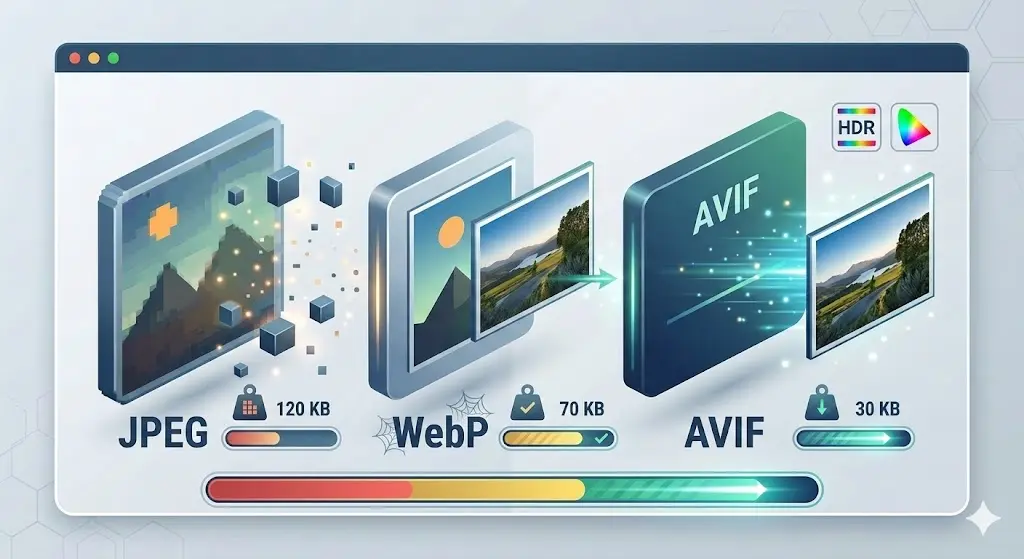
The image format landscape in 2026 is richer than ever. WebP has become the de facto standard for web images, supported by over 97% of browsers globally. AVIF is gaining ground fast, offering files 30 to 50 percent smaller than JPEG at equivalent visual quality, but encoding takes longer and browser support (around 92%) is not yet universal. HEIC, Apple's default photo format since iOS 11, remains a headache for anyone who needs to share iPhone photos with Windows or Android users.
TinyPNG added WebP support in recent years but still does not support AVIF output or HEIC input. For a tool that primarily targets web developers optimizing assets for Core Web Vitals, the absence of AVIF in 2026 is a notable gap.
Squoosh is the format king. It supports more codecs than any other tool on this list, including experimental options like JPEG XL and OxiPNG. If fine-grained control over encoding parameters is your priority, Squoosh is significantly more powerful than anything else. The trade-off is the single-file limitation and the lack of batch processing.
iLoveIMG is limited to JPEG and PNG output. No WebP, no AVIF. In a year where Google actively rewards sites that serve modern formats, this is a significant limitation for web-focused users.
Compressor.io supports JPEG, PNG, WebP, and SVG, but not AVIF or HEIC.
ZeroPNG supports JPEG, PNG, WebP, and AVIF as output formats, and accepts HEIC as input through a dedicated converter tool. The combination of modern format support with unlimited batch processing and client-side privacy makes it the most complete free option for web performance workflows.
Compression Quality: How Do the Results Actually Compare?
This is where things get interesting, because compression quality is not a single number. It depends on the source material, the target format, the quality setting, and the algorithm used.
We tested all five tools with the same set of 10 images, a mix of DSLR photographs, iPhone photos, macOS screenshots, logos with transparency, and web graphics with text overlays.
JPEG Compression
For JPEG photographs, all five tools produce results within a 5 to 8 percent range of each other at equivalent quality levels. TinyPNG uses an aggressive automatic algorithm that typically achieves 65 to 75 percent reduction, impressive, but you have no control over the balance between size and quality. ZeroPNG and Squoosh let you fine-tune the quality slider, so you can decide exactly where the sweet spot is for your specific use case. At quality 80, ZeroPNG's JPEG output is visually indistinguishable from TinyPNG's automatic result.
PNG Compression
PNG compression is where TinyPNG built its reputation. Their server uses a proprietary implementation of color quantization, reducing a 24-bit PNG with millions of colors down to an 8-bit palette of 256 colors or fewer. This achieves dramatic 60 to 80 percent reduction while maintaining visual quality that is virtually identical to the original at normal viewing sizes.
ZeroPNG uses the UPNG.js library to apply the same color quantization technique entirely in the browser. The output is functionally identical to TinyPNG, same algorithm, same quality, same file size reduction, but without uploading your files to anyone's server. This is not a marketing claim; UPNG.js uses the same quantization mathematics that TinyPNG's backend uses.
Squoosh applies OxiPNG for lossless PNG compression, which achieves smaller reductions (typically 10 to 30 percent) but preserves every single pixel. If you need bit-perfect accuracy, Squoosh is the right choice. For most real-world use cases where 60 to 80 percent reduction is more valuable, ZeroPNG and TinyPNG produce better results.
WebP and AVIF
For WebP output at quality 80, ZeroPNG and Squoosh produce nearly identical files. Both use the browser's native WebP encoder. TinyPNG's WebP output is comparable. For AVIF, only ZeroPNG and Squoosh support it. AVIF encoding is slower than other formats (it uses the computationally intensive AV1 codec), but the file size savings, typically 30 to 50 percent smaller than equivalent JPEG, are worth it for performance-critical websites.
Speed: Client-Side vs Server-Side
This is a factor that catches many people off guard. Server-side tools like TinyPNG and iLoveIMG require two network transfers for every image: the upload and the download. On a fast fiber connection, this is barely noticeable. On a typical home connection uploading a batch of 50 DSLR photos at 4 MB each, you are looking at 200 MB of upload time before compression even begins.
Client-side tools like ZeroPNG and Squoosh skip the network entirely. Compression starts the instant you drop the file. On a modern laptop with an 8-core processor, ZeroPNG compresses a batch of 50 images in 15 to 30 seconds. There is no upload wait, no download wait, no server queue.
The speed advantage of client-side processing becomes even more pronounced on slow or metered connections, mobile data, hotel Wi-Fi, airplane Wi-Fi, or networks in rural areas. ZeroPNG's PWA mode means the app itself is cached after the first visit. You can compress images with zero internet connection.
The Tool Ecosystem: More Than Just Compression
A compressor is just one piece of the image optimization puzzle. Here is where the tools diverge significantly in scope:
ZeroPNG offers six tools under one roof: Image Compressor, Image Converter (format conversion), HEIC to JPG Converter, EXIF and Metadata Scrubber, Image Cropper with social media presets, and an Image Watermark tool. All six run entirely in the browser. This makes ZeroPNG a comprehensive image utility suite rather than a single-purpose compressor.
TinyPNG is purely a compressor. It does one thing, and it does it well. There is an API for developers who want to integrate compression into their build pipelines. The API is paid (starting at $39 per year for 500 compressions per month).
Squoosh is purely a compressor with advanced codec controls. It excels at letting you experiment with encoding parameters, but it does not offer cropping, watermarking, EXIF removal, or format conversion beyond what the compression dialog provides.
iLoveIMG is the closest competitor to ZeroPNG in terms of tool breadth. It offers compression, resizing, cropping, conversion, watermarking, and more. The critical difference is that every iLoveIMG tool uploads your images to their servers. Additionally, free users face limitations on batch sizes and daily usage, with premium plans starting at $6 per month.
Compressor.io is a clean, focused compressor. No additional tools. The interface is elegant, and the before/after preview is well-implemented, but the scope is intentionally narrow.
Pricing: What "Free" Actually Means
Every tool on this list has a free tier, but the definition of "free" varies wildly:
- ZeroPNG: Completely free. No limits. No premium tier. No account required. Supported by non-intrusive advertising. Because compression runs on your device, ZeroPNG's server costs are near zero, it is hosted on Cloudflare Pages' free tier.
- TinyPNG: Free for 20 images per month with a 5 MB per-file limit. Web Pro costs $39/year (500 images/month). API pricing starts at $0.009 per compression after 500 free per month.
- Squoosh: Completely free. Open source. No limits on what you can compress. The limitation is single-file processing only.
- iLoveIMG: Free with limits on batch sizes and features. Premium starts at $6/month ($48/year). Premium unlocks higher batch limits, removes ads, and adds priority processing.
- Compressor.io: Free with batch limits (10 files). No paid tier visible, but functionality is constrained.
The genuine free options are ZeroPNG and Squoosh. Both are fully functional without payment. The difference is that ZeroPNG supports batch processing and ZeroPNG offers additional tools, while Squoosh offers deeper codec-level control for individual images.
Offline Support: The Underrated Feature
In a world that assumes constant connectivity, offline support sounds like a niche concern. It is not.
Photographers on location shoots, journalists in the field, security-conscious organizations that restrict internet access on production machines, travelers on international flights, all of these people need to compress images without an internet connection.
ZeroPNG is the only tool in this comparison that works completely offline. It is a Progressive Web App (PWA), visit the site once, and a Service Worker caches the entire application locally. From that point on, you can compress, convert, crop, and watermark images with zero connectivity. Not even Squoosh (despite being a client-side tool) fully supports offline use in its current state.
TinyPNG, iLoveIMG, and Compressor.io are entirely dependent on their servers. No internet, no compression.
Who Should Use What? Our Honest Recommendations
There is no single "best" tool for everyone. The right choice depends on what you prioritize:
Choose ZeroPNG if:
- You compress more than 20 images at a time regularly
- Privacy is non-negotiable (healthcare, legal, confidential business documents)
- You want a complete image toolkit (compress, convert, crop, watermark, EXIF removal) in one place
- You need offline support
- You work with HEIC files from iPhones
- You refuse to pay for basic image compression
Choose TinyPNG if:
- You compress fewer than 20 images per month
- You need an API for automated build pipelines (and are willing to pay for it)
- Privacy of the images being compressed is not a concern
- You value the brand recognition and established ecosystem
Choose Squoosh if:
- You are optimizing a single hero image and want maximum control over encoding parameters
- You want to experiment with emerging formats like JPEG XL
- You do not need batch processing or ZIP download
- You are a developer interested in understanding codec internals
Choose iLoveIMG if:
- You already use the iLovePDF ecosystem and want integration
- You need a wide range of image tools and do not mind server-side processing
- You are on a paid plan that removes the batch limits
Choose Compressor.io if:
- You compress small batches (under 10 images) occasionally
- You appreciate a clean, minimal interface
- You want SVG compression (one of the few tools that offers it)
The Bottom Line
The image compression landscape in 2026 has matured significantly. Server-side tools like TinyPNG pioneered accessible image optimization, and they still deliver excellent results, but the trade-offs of privacy exposure, file limits, and paid tiers are real.
Client-side tools have caught up in output quality while eliminating the privacy and cost concerns entirely. The browser is powerful enough in 2026 to run the same compression algorithms that used to require dedicated servers.
ZeroPNG sits at the intersection of privacy, power, and practicality. It is the only tool that combines unlimited batch compression, a full suite of six image tools, HEIC support, AVIF output, offline capability, and zero cost, all without your images ever leaving your device. For the vast majority of users who just need to compress a batch of images quickly, securely, and for free, it is the best option available in 2026.
But beyond the tool comparison, the real takeaway is this: you should not have to upload your personal photos to a stranger's server just to make the file size smaller. Client-side processing exists. It works. It is free. And in 2026, there is no good reason to accept anything less.
Try the Comparison Yourself
Drop your images into ZeroPNG and see the results. No uploads, no sign-ups, no limits. If we have not earned your trust with this article, your own browser will prove it.
Try ZeroPNG Free →