The Golden Age of "Free" Online Utilities
We've all been there. You have an urgent task: you need to compress a bloated PDF, aggressively shrink a photograph so it sneaks under an email attachment limit, rigorously convert an audio file format, or flawlessly remove the background from a portrait. Instead of downloading heavy, prohibitively expensive professional software, you simply type your problem into Google. Instantly, you are greeted with dozens of polished, wonderfully functional, and completely free web applications eager to solve your exact problem.
You drag and drop your sensitive file onto their glowing "Upload Here" interface. A loading bar fills up. A few moments later, your perfectly optimized file is ready to download. You close the tab and move along with your day, grateful for the sheer convenience of the modern internet.
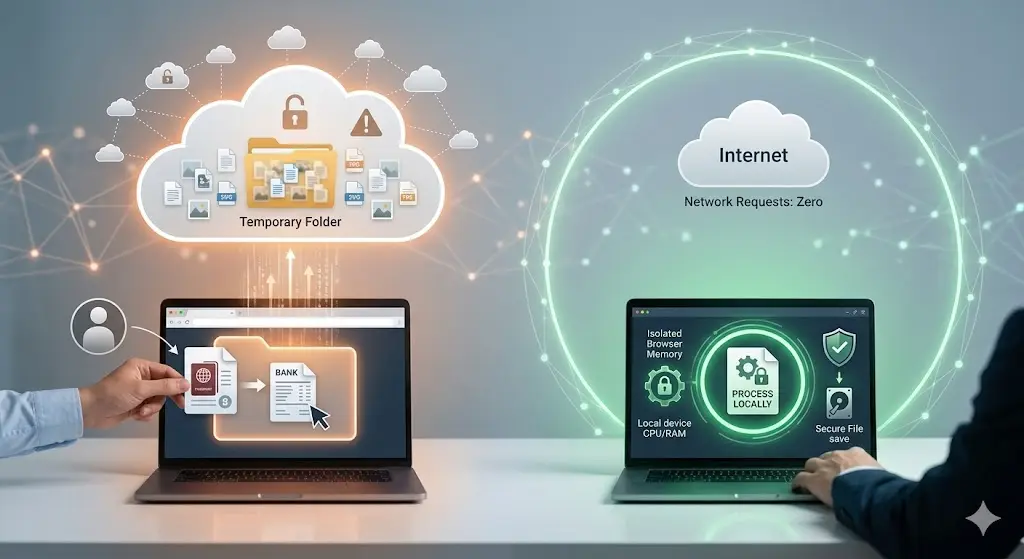
It feels like magic. It feels generous. But beneath the surface-level convenience, a highly coordinated, lucrative data-harvesting operation is quietly running. The age-old adage stating "if you aren't paying for the product, you are the product" has never been more chillingly accurate than it is in the ecosystem of free online tools. Providing heavy server-side processing for millions of users costs massive amounts of money in bandwidth and compute power. Companies don't casually absorb these costs out of sheer kindness. Let’s pull back the curtain and meticulously dissect what truly happens to your personal files when they hit an external server.
1. The Bait and Switch: How The Honeypot Mechanism Works
Many free utility sites act as digital honeypots. They bait users with highly effective, deeply necessary features to capture an endlessly renewing stream of raw user data. The fundamental transaction isn't file conversion; the transaction is your data exchanged for a temporary service.
Historically, free sites sustained themselves purely via aggressive display advertising. You viewed banner ads while your file compressed, and those fractions of pennies kept the servers lit. In 2026, display advertising revenues have dropped precipitously, prompting companies to locate more lucrative revenue streams. The new gold rush? Data brokerage and artificial intelligence training sets.
When you upload a photograph, a PDF, or a spreadsheet, you aren't just sending them pixels and text. You are voluntarily feeding a sprawling apparatus that monetizes every byte of context it can legally squeeze from your upload. The "Terms of Service" (which nobody reads) regularly contain predatory, aggressively broad clauses granting the parent company a perpetual, non-exclusive, irrevocable license to use, reproduce, modify, and distribute any content uploaded to their servers. They disguise this as a technicality needed "to perform the service," but the legal language intentionally provides them a blank check.
2. Exactly What Kind of Data Are You Handing Over?
A staggering majority of people fundamentally misunderstand how much context is embedded inside seemingly innocuous files. You may think you are merely uploading a picture of your living room, but practically speaking, you are handing over a detailed dossier. Let's explore what is frequently extracted:
Personally Identifiable Information (PII)
If you upload a resume to compress it into a PDF, you are providing your full name, physical address, direct phone number, email address, educational background, and complete work history. These documents are routinely OCR-scanned (Optical Character Recognition) so companies can parse the text directly into structured databases, which are then occasionally sold to recruiting pipelines or aggressive marketing firms.
EXIF and Metadata Footprints
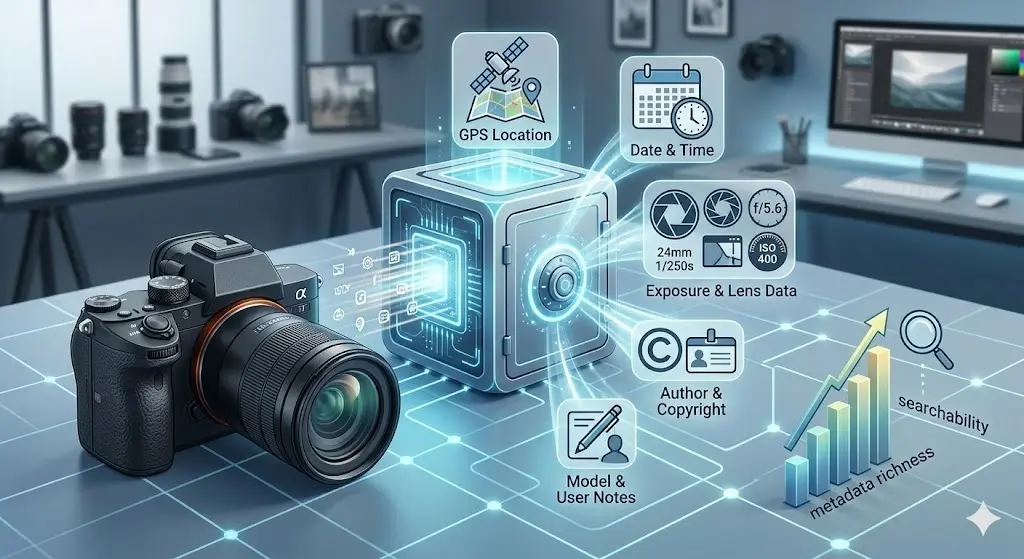
Photographs are notorious privacy liabilities. Every snapshot taken by a modern smartphone contains EXIF metadata. This invisible textual footprint records your exact GPS coordinates when the photo was taken (accurate to within a few meters), the precise timestamp, the exact make and model of your smartphone, your camera's focal length, and occasionally even owner ID strings.
By simply cross-referencing GPS nodes across multiple photograph uploads, a malicious actor or data broker can aggressively map out your routine: identifying your home address, what time you normally leave for work, which coffee shop you frequent, and where you send your children to school.
Machine Learning and Generative AI Fodder
In 2026, the biggest buyers of raw data are the tech giants powering generative AI. Large Language Models (LLMs) and advanced Image Diffusion models require unimaginably large datasets to learn. Your uploads frequently become uncompensated training fodder. That private illustration you sketched? It's teaching a model how to draw. That financial projection spreadsheet you needed merged? An AI parameter might be mathematically digesting it. When privacy isn't properly fenced, your personal intellectual property silently bleeds into collective neural networks without your consent or knowledge.
3. The Myth of "Deleted in 24 Hours"
Almost every free utility website prominently features a comforting shield icon with a reassuring promise: "Trust us. All files are securely processed and automatically deleted from our servers within 1, 2, or 24 hours."
This is arguably the most pervasive and dangerous myth in the utility sector. Even if we generously assume the company explicitly executes a script deleting the original `.jpg` or `.pdf` file from their primary web storage, the functional reality of server-side architecture means your data is never truly gone.
- The Shadow Backups: Enterprise servers run automated backup routines to prevent data loss. If you upload a file at 10 AM, and the server conducts a global backup at noon, your file is securely written to a redundant, deeply archived disk entirely distinct from the primary web storage. The "24-hour deletion" script rarely recursively scrubs through long-term cold storage backups.
- Derivative Datasets: Even if they delete the source file, they rarely delete the derived metadata. They delete your photograph but permanently retain the GPS location, phone model, timestamp, and the AI-generated keyword tags (e.g., "male", "30s", "outdoor", "golden retriever") they extracted during the 10 seconds they held your image. The ghost of your data lives on permanently in their relational database.
- Third-Party Processors: Sometimes the website you upload to doesn’t actually do the compression. They simply act as a frontend middleman, utilizing APIs to forward your file to Google Cloud, Amazon Web Services, or external third-party processing clusters. They cannot definitively guarantee deletion protocols residing on servers they don't even own.
4. Real-World Fallout: When Privacy Fails
Treating every web tool with suspicion sounds aggressively paranoid until you look at the documented, real-world consequences of treating the internet like a trustworthy filing cabinet. Consider these entirely realistic and highly frequent scenarios:
Corporate Liability: An employee needs to translate a highly confidential internal PDF detailing a pending merger. They utilize a free online translator tool. The site scrapes the text, and suddenly highly volatile confidential corporate strategies are sitting on an unencrypted server located internationally, deeply breaching NDAs and triggering severe regulatory compliance failures.
The Harassment Vector: A user uploads pictures to a free "Image Resizer" to shrink photos for a community forum. The resizer successfully shrinks the file dimensions but completely fails to strip the EXIF data. The user posts the resized photo. A sophisticated stalker downloads the photo off the forum, reads the intact metadata, and physically tracks the user's home location.
Financial Exposure: During tax season, millions resort to "Merge PDF" tools to combine their W2s, bank statements, and investment records into a single file loop for their accountant. You are literally packaging your Social Security Number, complete financial breakdown, and physical address, then willfully handing it over to an anonymous website with an unverified "Free Tools Corp" header registered to a PO box.
5. The Client-Side (Serverless) Revolution
The solution to this systemic privacy nightmare isn't just to "read the terms of service carefully" or completely stop utilizing tools. The genuine solution requires a massive paradigm shift in how we architect web utilities. We need to completely eliminate the server from the processing equation.
Historically, web browsers lacked the raw computational muscle required to process complex files directly. That has changed. Utilizing powerful modern technologies such as WebAssembly (Wasm) and native HTML5 Canvas APIs, the web browser on your phone or laptop is now a formidable supercomputer.
This ushers in the era of Client-Side Processing. When you use a deeply optimized modern application, the website serves you the code, and then effectively steps away. All the heavy lifting, the image compression, the format conversion, the metadata scrubbing happens entirely natively within your device’s isolated memory, locally relying on your own CPU.
The benefits of a structurally serverless utility architecture are absolute:
- Zero Upload Privacy: Because the processing happens locally on your machine, your file literally never leaves your device. It never travels across the internet, meaning no intercepts are possible.
- Instant Processing: You are completely bypassing the speed limitations of your internet provider's upload bandwidth. Processing massive 50MB files takes milliseconds because there is no bottleneck to an external cloud.
- Guaranteed Erasure: When you close the browser tab, the memory is instantly flushed. No backups exist. No shadow copies remain. It is mathematically impossible for a server to steal what a server never actually received.
6. Actionable Steps: How to Protect Yourself
Your digital footprint is immensely valuable, and protecting it requires proactive behavioral changes. Implement these immediate practices to secure your data from predatory free utilities:
1. Audit Your Network Traffic
If you are technically inclined, open your browser's Developer Tools (F12) and monitor the "Network" tab before dragging a file onto a mysterious tool. If you see a massive outgoing POST request transferring your entire file size to an API endpoint at the exact moment you drop the file, abort immediately. They are uploading your data to a server.
2. Scrub Metadata Manually
Never rely on a secondary downstream tool (like Facebook or a marketplace) to arbitrarily protect your location data. Explicitly strip all embedded EXIF tags before publishing. By utilizing dedicated, local tools like our ZeroPNG EXIF Remover, you guarantee that geographical markers and device fingerprints are thoroughly obliterated natively.
3. Demand Serverless Alternatives
Stop using server-dependent legacy sites whenever practically possible. Vigorously transition to entirely modern, browser-based native applications. If a tool requires a cumbersome progress bar simply indicating how long it will take to "upload" to their remote processing server, close the tab and find a client-side alternative.
4. Value Transparency Above All Else
If a utility website obfuscates how they process your files or hides their methodology behind dense legal jargon, they have explicitly forfeited your trust. Legitimate, privacy-first tools unequivocally trumpet their localized, serverless architecture from their main homepage because it operates as a monumental competitive advantage rather than a liability.
The ZeroPNG Commitment
We built the ZeroPNG ecosystem entirely out of deep-seated frustration with this exact status quo. The modern web deserves highly capable utility tools that don't aggressively compromise user privacy for profit. Every single tool on the ZeroPNG platform from our core image compressor to our HEIC format converter has been meticulously engineered to operate 100% locally directly within your browser.
We embrace the Zero Upload Promise. We never see your files. We do not maintain any backend database of your imagery. We run no analytical scraping nodes. You retain unconditional, unilateral control over your private data. The functionality you demand, firmly paired with the absolute privacy you deserve.
Try a Truly Private Tool
Experience the sheer speed and absolute security of local, browser-based processing. Compress, convert, or crop your images without ever uploading a single byte to an external server.
Explore ZeroPNG Tools