The Photo That Got a Man Arrested
In 2012, John McAfee, the antivirus software pioneer, was one of the most wanted men in Central America. He had fled Belize after police sought him for questioning over a neighbour's murder. He was hiding somewhere, presumably somewhere remote, doing his best to disappear.
Then Vice magazine published an interview with him. Their journalists had found him. The article included a photo taken on an iPhone 4S.
Nobody noticed the photo contained GPS coordinates. Nobody thought to strip the metadata. Within hours, internet users had extracted the embedded location data and published McAfee's exact position, a villa in Guatemala, to the world. Guatemalan authorities arrested him two days later.
The photograph did not betray him. The invisible data inside the photograph did.
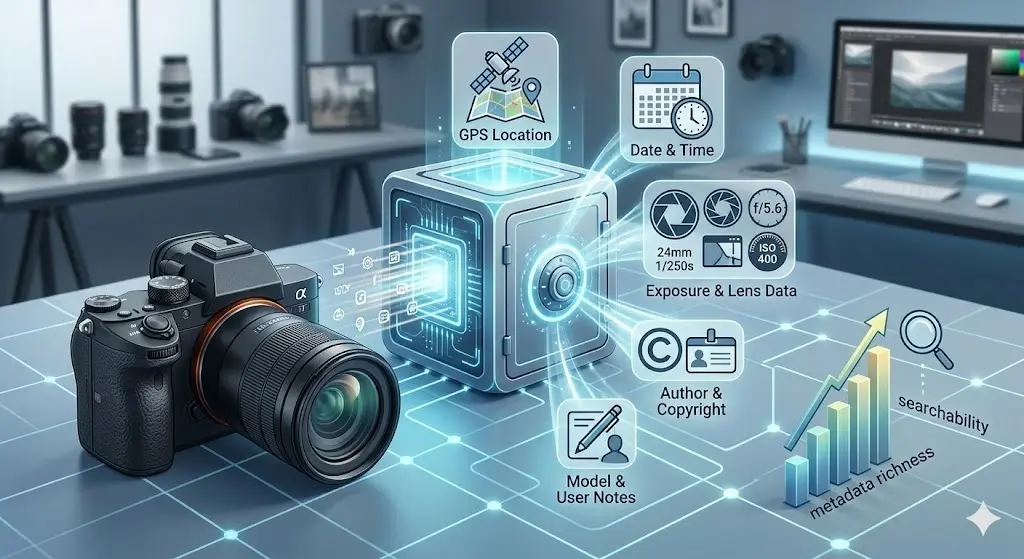
That data is called EXIF metadata. It lives inside virtually every photo taken on a smartphone or digital camera. And the overwhelming majority of people who take, send, and post photos have never heard of it.
What Is EXIF Data?
EXIF stands for Exchangeable Image File Format. It is a standard introduced in 1995 that defines a collection of metadata fields embedded directly inside image files - JPEGs, HEICs, TIFFs, and others, as invisible, machine-readable text alongside the visible pixels.
The original purpose was practical and benign: allow cameras to record the settings used to take each shot, so photographers could review them later and improve their technique. Aperture, shutter speed, ISO, white balance, useful technical information baked into the file itself.
Then smartphones arrived. And smartphones have GPS.
The combination of a permanent internet connection, a precision GPS receiver, and a camera in everyone's pocket turned a useful technical feature into something considerably more complicated. Modern smartphones embed not just camera settings into photos but also the exact coordinates of where the photo was taken, typically accurate to within three to five metres.
The Full List of What's Inside Your Photos
Open any photo taken on a modern iPhone or Android device in an EXIF reader and you will typically find some or all of the following:
Location Data
- GPS Latitude and Longitude - precise coordinates, accurate to approximately 3–5 metres
- GPS Altitude - how high above sea level the photo was taken (useful for identifying which floor of a building)
- GPS Timestamp - the exact UTC time the location was recorded
- GPS Direction - the compass bearing the camera was pointing when the shutter was pressed
- GPS Speed - how fast the device was moving (whether you were walking, in a car, stationary)
Device Information
- Camera Make and Model - "Apple iPhone 15 Pro Max", "Samsung Galaxy S25 Ultra"
- Software Version - the iOS or Android version running when the photo was taken
- Lens Model - which lens was used (main, ultrawide, telephoto)
- Unique Device Identifier - in some cases, a serial number that can link multiple photos to the same device even across different accounts or platforms
Temporal Data
- Date and Time (Original) - when the photo was taken, down to the second
- Date and Time (Digitised) - when it was processed or imported
- Date and Time (Modified) - the last time the file was changed
Technical Camera Settings
- Aperture (f-stop), shutter speed, ISO sensitivity
- Focal length and 35mm equivalent focal length
- Flash status (fired, not fired, not available)
- White balance setting
- Metering mode and exposure program
- Scene capture type (standard, landscape, portrait, night)
Editing History
- Software Used - if the photo was edited in Lightroom, Photoshop, Snapseed, or any other application, that is recorded
- Colour Profile - the embedded ICC colour profile
- Orientation - whether the image has been rotated
Embedded Thumbnail
This one surprises people most. Many JPEG files contain a small thumbnail image embedded in the metadata, a preview of the photo generated at the time of capture. Here is the critical detail: the thumbnail is often generated before any edits are applied. If you crop a photo to remove something sensitive from the frame, a street sign, a face in the background, a location identifier, the thumbnail embedded in the file may still show the original, uncropped image.
In 2003, a programmer discovered this while examining photos from digital cameras and found that cropped photos from several popular models still contained the uncropped original in the thumbnail. The problem persists in certain tools today.
Who Can Read This Data, and When?
The common reassurance is that major social platforms strip EXIF data when you upload. This is largely true - Instagram, Facebook, Twitter/X, and TikTok do remove location metadata on upload. But this reassurance is dangerously incomplete.
Your EXIF data travels with your photo intact in every one of these situations:
- Email attachments - Gmail, Outlook, and virtually every email client forward JPEG files without modification
- WhatsApp images sent as documents - the "document" send method bypasses WhatsApp's compression and strips nothing
- iMessage and SMS - photos sent in full resolution preserve all metadata
- Dropbox, Google Drive, and OneDrive - cloud storage services preserve files exactly as uploaded
- AirDrop and Nearby Share - peer-to-peer transfers send the raw file unchanged
- Personal websites and blogs - any CMS that does not explicitly strip metadata before display (most do not by default)
- LinkedIn profile photos - LinkedIn preserves EXIF data in uploaded images
- Freelance portfolios - photos uploaded directly to portfolio sites like Behance or personal domains
- Stock photo contributions - images submitted to stock libraries often retain metadata intentionally (for copyright purposes) but expose location in the process
- Client deliverables - photos sent to clients via WeTransfer, download links, or direct file transfers
- Discord - image uploads in servers preserve EXIF data visible to anyone who downloads the file
- GitHub and GitLab - images committed to repositories include full metadata visible in the raw file
Social media stripping is a safety net full of holes. The situations where your metadata survives outnumber the situations where it is removed.
The Real-World Consequences
The McAfee case is dramatic but not unique. EXIF metadata has been involved in real, documented harm:
Stalking and Domestic Abuse
Multiple domestic violence support organisations now include EXIF stripping in their digital safety guidance for survivors. A photograph sent from a new location, to a family member, to a friend, to a support worker - can reveal that location to anyone who intercepts or accesses the file. Survivors who have carefully moved without telling their abuser have inadvertently disclosed their new address through photos.
The Paparazzi and Celebrity Locations
Several celebrities have had their home addresses extracted from photos posted by well-meaning friends or family members. A photo taken at a birthday party at home, posted to Instagram (which strips the metadata), but also emailed to relatives (which does not), is a data point waiting to be collected.
The Journalist and the Source
Investigative journalists and their sources have been compromised when documentary photos, passed from source to journalist via insecure channels, contained GPS data that identified a protected location. This is now a standard concern in press freedom organisations' operational security guidance.
The Developer Who Committed Photos to Git
A widely-cited security incident involved a developer who pushed product mockup photos to a public GitHub repository. The photos, taken at the company's unreleased product launch venue, contained GPS coordinates. A competitor extracted the location, attended the event, and photographed the unreleased products days before the company's planned announcement.
The Experiment: Check Your Own Photos Right Now
Do not take our word for it. Take a photo from your phone's camera roll, ideally one taken at home, and run it through ZeroPNG's EXIF viewer. The tool reads your file entirely in your browser. Nothing is uploaded.
What you will likely find in a photo taken on a modern iPhone or Android phone:
- Your precise GPS coordinates, accurate enough to identify your specific flat or house number
- The exact date and time you were there
- The make and model of your phone
- The iOS or Android version you were running
- Which camera lens was used
- The exact altitude, suggesting which floor of a building
If the photo was taken on a DSLR or mirrorless camera, you will see camera body model, lens model, and all shooting settings. No GPS unless the camera has built-in GPS or was paired with a phone for location tagging.
If the photo was edited before being sent, you may also see which software was used and when the edit was made, allowing someone to infer how long you spent on the photo, and on which device.
How to Strip Metadata Before Sharing
There are several approaches, with different tradeoffs:
Method 1 - Use ZeroPNG (Browser-Based, Zero Upload)
ZeroPNG's EXIF remover strips all metadata from JPEG and PNG files directly in your browser. Your photos never leave your device. The cleaned file downloads immediately. This is the fastest method for one-off sharing and works on any device without installing anything.
Method 2 - iPhone Built-In (iOS 15+)
When sharing a photo from the Photos app, tap Options at the top of the share sheet and toggle off Location. This strips GPS data before sharing but preserves other metadata. Note that this only works through the Photos share sheet - not when sharing files from the Files app or via AirDrop from other apps.
Method 3 - Windows Right-Click
Right-click a JPEG → Properties → Details tab → "Remove Properties and Personal Information" at the bottom. Select "Remove the following properties from this file" and check everything. This is batch-capable but slightly cumbersome for regular use.
Method 4 - macOS Preview
Open image in Preview → Tools → Show Inspector → GPS tab → click "Remove Location Info". This only removes GPS data, not device information or timestamps.
Method 5 - ExifTool (Command Line, Batch)
For developers or power users processing large numbers of files:
# Remove all metadata from all JPEGs in a folder
exiftool -all= /path/to/folder/*.jpg

# Remove only GPS data
exiftool -gps:all= image.jpg

# Process recursively
exiftool -all= -r /path/to/folder/
What About Screenshots?
Screenshots are different from photos. On most devices, screenshots do not embed GPS coordinates, the operating system generates them directly rather than capturing from a camera. However, they still contain:
- The exact timestamp of when the screenshot was taken
- Device model and OS version
- Screen resolution (which can narrow down the exact device model)
- Colour profile information
Screenshots that capture private conversations, confidential documents, or unreleased work and are then shared externally still carry enough device fingerprinting to identify the source device in many cases. This matters in workplaces that track leaks.
The Simple Habit That Changes Everything
You do not need to understand EXIF format specifications to protect yourself. You need one habit: before sending any photo outside a major social platform, strip the metadata.
This takes 10 seconds. It costs nothing. It has no visible effect on the image. And it closes a privacy hole that has been silently open for the entire time you have owned a smartphone.
The information embedded in your photos was put there to help your camera remember its settings. That purpose is reasonable. Carrying it with you everywhere you share that photo, to your clients, your colleagues, your family, your lawyer, your online communities, is not what anyone intended. It is a default that serves hardware engineers, not people.
Every photo you take is a record of a moment. It should not also be a record of your exact location, your device identity, and a timeline of your whereabouts. Changing that is a 10-second decision.
See What's Hidden in Your Photos - Then Remove It
Drop any JPEG or PNG into ZeroPNG's EXIF tool. See every piece of metadata embedded in your photo, then download a clean version with all of it stripped. Runs entirely in your browser. Nothing is uploaded. Nothing is stored.
Check and Remove EXIF Data →